
Guide · Bookings and calendar
A photography booking app that keeps every shoot organized
Most photographers don't lose bookings — they lose the details around them. The date is in a calendar, the location in a message thread, the package in an email and the deposit in a banking app. When a client asks to move the shoot or you need to know what is still owed, you end up searching four places.
This guide covers what a booking record should contain, how to keep your schedule free of double bookings and how to track deposits and remaining balances. It also explains how PhotoPlan, an iPhone app for photographers, handles each step — and what it deliberately does not do.
What every booking record should contain
Whether you use a notebook, a spreadsheet or an app, a booking is only useful if it answers the questions you will be asked before and on the shoot day. A practical checklist:
- Client name and a way to reach them (phone or WhatsApp)
- Shoot date, start time and expected duration
- Location or venue, so you can plan travel
- Package and album, so delivery expectations are clear
- Agreed price, deposit received and remaining balance
- Who is shooting, if you work with other photographers
- Notes that matter later — a special request, a delivery deadline
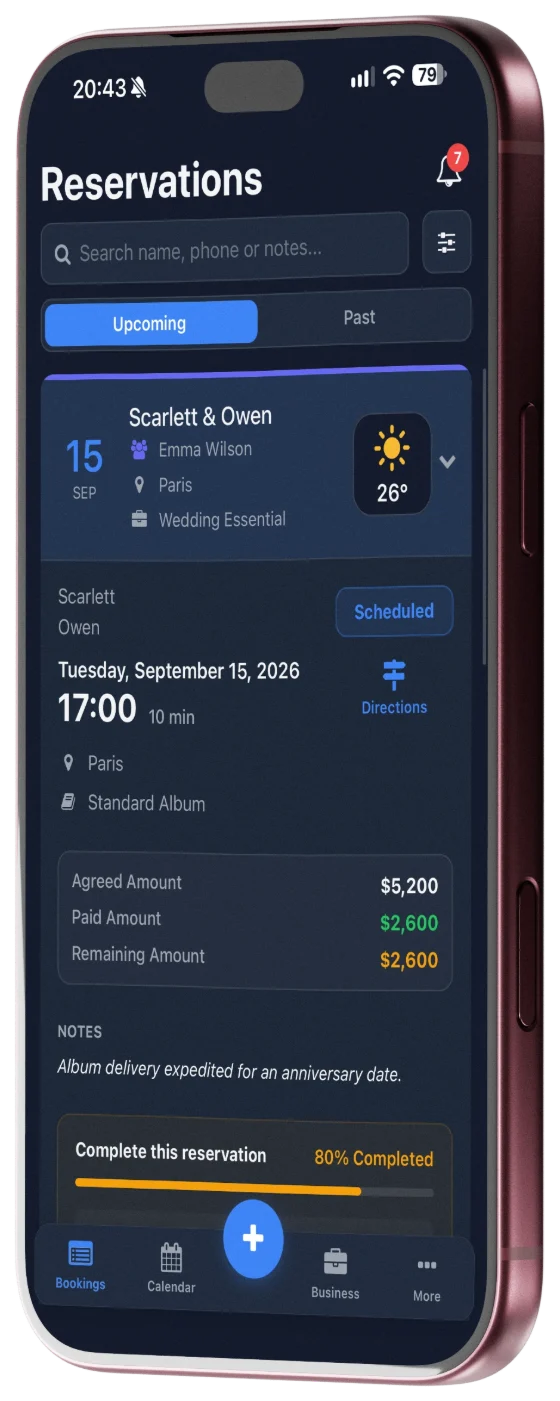
In PhotoPlan each reservation holds these details. Packages, albums and duration options are lists you define once and then pick from, so the same package is always written the same way. Each reservation also shows what is still missing — contact, venue, package, price or deposit — so gaps are visible before the shoot day rather than on it.
Keeping your calendar free of double bookings
Double bookings rarely happen because a photographer forgets a wedding. They happen when a tentative date is held in one place and confirmed in another, or when a second shoot is squeezed into the same afternoon. Two habits prevent most of them: keep one calendar that contains every confirmed shoot, and block the time you are not available.
PhotoPlan puts your reservations on a calendar and lets you block times when you are unavailable. If you save a reservation that overlaps another one at the same time, the app asks you to confirm before saving it.
If you also want your shoots in Apple Calendar or another calendar app, you can subscribe to a private PhotoPlan calendar link. That feed is one-way and read-only: changes made in the other app do not change your PhotoPlan reservations, and how often it refreshes depends on that app.
Tracking deposits and remaining balances
For many wedding and event photographers, a deposit secures the date and the balance is due close to the shoot. The mistake to avoid is mixing up three different numbers: what the client agreed to pay, what you have actually collected and what is still outstanding.
PhotoPlan keeps them separate for every reservation: the agreed amount, each payment you record (deposit, partial or final payment) and the remaining balance, which updates when you record a payment. Filters help you find reservations with an open balance or overdue payments, and optional notifications can remind you a few days before a shoot when no deposit has been recorded.
PhotoPlan records the payments you have received. It does not charge cards, send invoices or collect money from clients, so you keep using the payment method you already use.
Moving over from a spreadsheet
If your bookings already live in Excel, you don't have to retype them. PhotoPlan's import uses an Excel template: you move your rows into it, then a preview shows which rows will be imported, which are duplicates and which have errors. Nothing is saved until you confirm, and existing reservations are skipped rather than overwritten. You can export your reservations back to Excel at any time.
On the Free plan, imported reservations count toward the 5-reservation limit.
What PhotoPlan does not do
Being clear about limits saves you a wasted download:
- No public booking page: clients do not book or pay through PhotoPlan; you add reservations yourself.
- No invoices, card payments or contract signing.
- No client photo galleries or photo delivery.
- iPhone only; there is no Android app.
If you need those client-facing tools, a full studio CRM may suit you better. PhotoPlan focuses on the photographer's own side: the schedule, the details and the money still owed.
Plans
PhotoPlan is free to download. The Free plan holds up to 5 reservations; completed and cancelled reservations count toward that limit, deleted ones don't. Pro removes the limit and adds financial tracking and statistics, and eligible users can try Pro free for 7 days through the App Store. The Studio plan adds team features. Prices depend on your App Store region and are shown in the app.
Frequently asked questions
Can clients book a session themselves through PhotoPlan?
No. PhotoPlan is for managing the bookings you have agreed with clients. There is no public booking page or client portal.
Does PhotoPlan take payments from clients?
No. You record the payments you receive — deposits, partial and final payments — and PhotoPlan keeps the remaining balance up to date. Card payments and invoices stay with your existing tools.
Can I see my shoots in Apple Calendar?
Yes, through a private calendar subscription link. It is a one-way, read-only feed: editing an event in another calendar app does not change your PhotoPlan reservation.
Is there an Android version?
Not at the moment. PhotoPlan is available for iPhone on the App Store.