
Guide · Studio teams
Scheduling a photography team without the group-chat chaos
Once a studio has more than one photographer, the hard part is no longer the camera work. It is knowing who is shooting which booking, whether they have confirmed, what they will be paid and who is allowed to see the client’s price.
This guide walks through a simple way to coordinate a photography team on busy days and shows how PhotoPlan's Studio plan supports each step on iPhone.
Start from one shared schedule
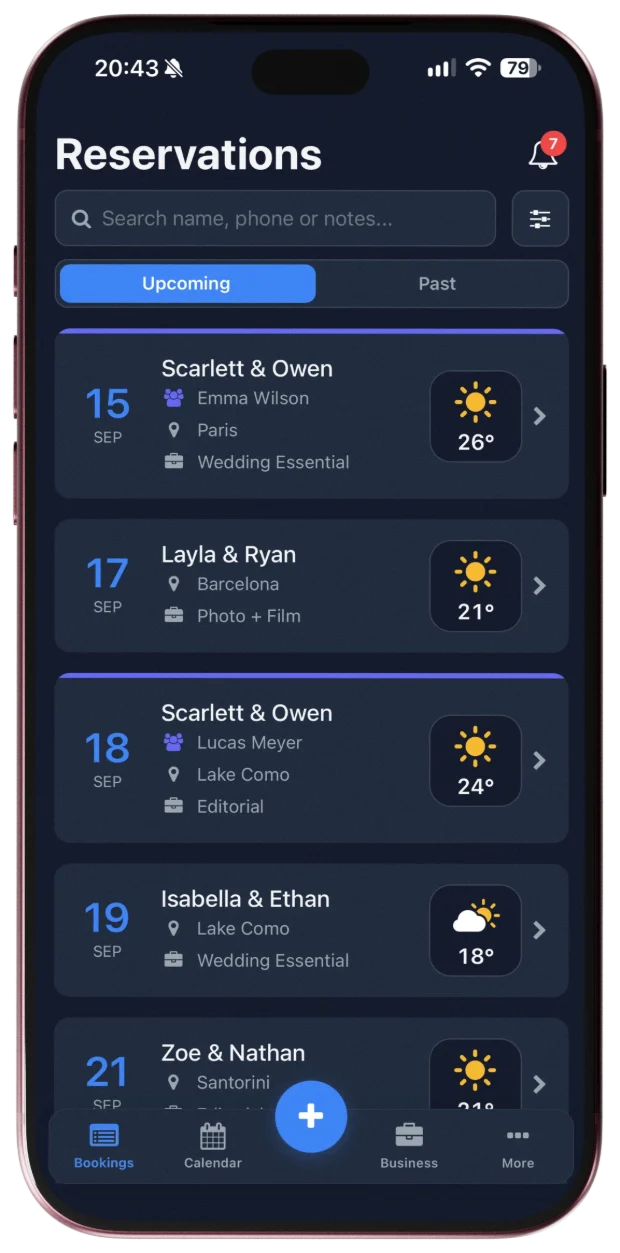
Second shooters and assistants usually learn about their jobs through messages. That works until a date moves and one person misses the update. The fix is a single source of truth: every booking lives in one place, and each assignment is attached to the booking itself rather than to a chat thread.
In PhotoPlan the studio owner keeps the reservations, and each shoot can be assigned to a team member. Team members see the shoots assigned to them in their own app, next to their own bookings, so a change shows up where they already look.
Assign shoots and get a clear yes or no
An assignment is only reliable once the photographer has accepted it. When you assign a shoot in PhotoPlan, you choose the team member and the fee for that job. The assignment becomes active when the member accepts it, and they can also decline it. You can assign someone once they have accepted your invitation to the studio.
When several shoots fall on the same day, check availability before assigning. Team members can choose to share their availability with the studio owner: the owner sees busy times and general event categories, while the member's own client names and details stay private.
Decide who sees prices and who can edit
Not everyone on a shoot needs to know what the client paid. PhotoPlan's Studio plan has per-member permissions: you decide whether each person can view financials and whether they can edit reservation details. A second shooter can see the time, place and notes for a job without seeing the package price.
Keep track of what you owe your team
Per-shoot fees for freelance photographers are easy to lose track of in a busy season. In PhotoPlan each assignment carries the agreed fee. When you record a payment to a team member, it is sent to them for approval and kept in a payment history. A payment can be added once the member has accepted the assignment.
How the Studio plan works for your team
- Team features — assignments, roles and permissions — are part of the Studio plan, with unlimited team members.
- Team members don't need a paid subscription of their own: work a studio assigns to them never counts toward their Free plan limit.
- Each team member needs a PhotoPlan account on iPhone. You invite them by email and can also share the invitation link.
- When you set up a studio, PhotoPlan may offer a free Studio access trial. It is separate from the 7-day Pro trial on the App Store, and nothing is charged when it ends.
What stays outside PhotoPlan
- Team chat: PhotoPlan does not replace your messaging app.
- Sending money: PhotoPlan records agreed fees and payments; the transfer itself happens outside the app.
- Client galleries and photo delivery.
- Android: everyone on the team needs an iPhone.
Frequently asked questions
Do my team members need to pay for PhotoPlan?
No. Team features are part of the studio owner's Studio plan, and work a studio assigns never counts toward a team member's Free plan limit. Team members need a PhotoPlan account on iPhone.
Can a team member see what the client paid?
Only if you allow it. Each member’s permissions decide whether they can view financials and whether they can edit reservations.
What happens if a photographer can't take a shoot?
They can decline the assignment, and you can assign the shoot to someone else. An assignment only becomes active after the member accepts it.
Does PhotoPlan send money to my team?
No. PhotoPlan records the fees and payments you agree with your team; the transfer itself happens outside the app.